


Shonen Jump Manga & Comics
4.85.51K Reviews
App Specs
- Version
- 4.13.5
- Updated On
- License
- Free
- Downloads
- 1,000,000+
- Developer
- Viz Media
- Categories
- Comics
- Platform
- Android, iOS
Screenshots


 Analysis by AppCompare
If you're a manga enthusiast like me, you've probably spent countless hours diving deep into the worlds of your favorite characters. That's where the Shonen Jump Manga & Comics app comes in, offering a treasure trove of manga right at your fingertips. Let me take you through my experience with this fantastic app.
What a focused manga library changes
Shonen Jump Manga & Comics is a comics reading app from Viz Media, and its appeal is its focus: it brings Shonen Jump manga together instead of asking me to assemble a reading routine across scattered sources. That makes it especially useful when I already know the kind of series I want to follow. It is free to install, rated Teen, and has a 4.9 average from around 81,000 ratings; those figures point to a well-liked app, though they do not guarantee that its catalog or reading style will suit everyone.
The important practical distinction is that a dedicated manga app is not the same as a general comic reader. A general reader may be better if I want to organize files I already own or browse comics from many publishers. Here, the experience is built around following manga in the Shonen Jump space. That narrower focus can make it easier to return to familiar series, but it is also a reason to look elsewhere if I want one app to cover a broad mix of comics.
All Your Favorites in One Place
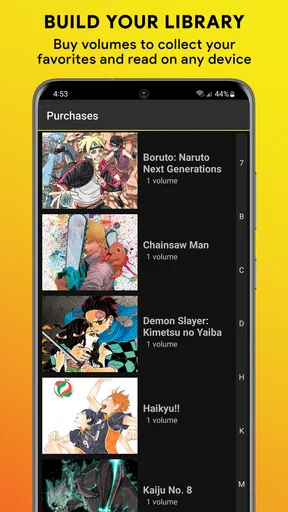
When I first opened the Shonen Jump Manga & Comics app, I was thrilled to see a huge library of popular titles. From classics like "Naruto" and "One Piece" to newer gems like "Demon Slayer," it's all there. The app makes it super easy to find what you're looking for with its intuitive search and category filters. Discovering new series has never been easier, and I found myself adding way too many titles to my reading list.
Finding a series without losing your place
In practice, I would treat search and filters as a way to narrow a browsing session, not as a substitute for knowing exactly what I want. If I am choosing between several series, I look at the results, open a title that catches my attention, and then decide whether it deserves a place in my regular reading rotation. A useful habit is to keep that rotation short: a few active favorites are easier to revisit than a long list I forget to check.
This also helps when I am new to a series. Instead of committing to a large backlog immediately, I can sample a title and see whether its pacing and tone work for me. Manga is often read chapter by chapter, so the first impression may not tell the whole story; still, a small trial is a sensible way to avoid collecting more reading obligations than I can enjoy. Readers who prefer a broad, cross-publisher catalog may find a general digital comics service more convenient, while this app makes more sense when Shonen Jump is the reason for opening it.
A Seamless Reading Experience
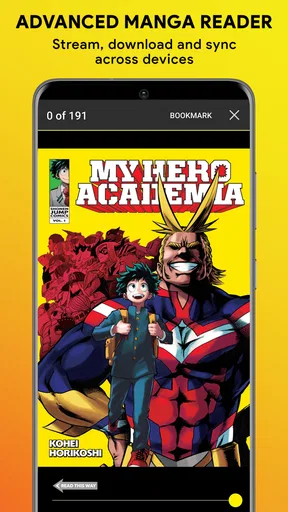
The reading experience on this app is top-notch. The pages load quickly, and the images are crisp and vibrant, making you feel like you're holding a physical copy. You can also choose different viewing modes, which is great if you're reading on a smaller screen. I particularly love the "night mode" feature, perfect for late-night reading sessions. It's clear that the developers put a lot of thought into making the reading experience enjoyable and accessible.
Worth Reading Before You Choose

EA SPORTS FC Mobile 26 Is a Bigger Football Game, but It Takes Time

Flipboard Shows What News Apps Must Do Beyond the Feed

Switching to Android Auto Means Rethinking Your Driving Routine

Google Calendar Makes a Crowded Week Easier to Manage

Ludo King Makes the Most of the Minutes Between Plans

Baby Panda World Brings Quick Play to Modern Phones, but Its Game Library Feels Busy
Making phone reading comfortable
Screen size changes the experience more than I expected. On a phone, I find it helps to settle into a comfortable position and use a viewing mode that makes the page easy to follow, rather than constantly zooming or shifting my grip. Night mode is useful when I read in a dim room, but it is not a replacement for lowering screen brightness if the display still feels harsh. On a tablet, manga pages have more room to breathe, so readers who care most about a spacious page may prefer that larger screen.
A realistic use case is a short break between errands: I open a chapter, read a few pages, and return later when I have more time. That flexibility is part of the appeal, but a phone is still a small window onto artwork designed as pages. If you dislike reading images on a compact display, or want the feel of paper and a larger spread, printed volumes remain a better fit. The app is most convincing when convenience matters more than reproducing the physical-book experience exactly.
Stay Updated with Ease
One of the best features is how the app keeps you updated with the latest chapters. You can subscribe to your favorite series and get notifications as soon as new chapters are released. For someone who hates waiting, this feature is a lifesaver. Plus, the "offline reading" option means you can download chapters to read on the go, which is perfect for those long commutes.
Using updates and offline chapters thoughtfully
Notifications are handy if I follow a few ongoing series, but they can become noise when every title in a large reading list is set to alert me. I would start by subscribing only to the series I genuinely want to keep up with, then adjust notifications if they begin interrupting work or quiet time. This turns the feature into a reminder rather than a stream of distractions.
Offline reading is particularly useful when I know I will be without a dependable connection, such as during a commute or while waiting somewhere with limited service. The practical tip is to download chapters before leaving, while I can still browse normally, and to check that the titles I want are ready before relying on them. Downloading is a convenience, not a reason to assume every chapter will always be available offline; readers should plan around the chapters the app lets them save. If most of my reading happens at home with reliable internet, offline access matters less, but it can make a big difference on travel days.
User-Friendly Interface
The app is designed with the user in mind. Navigation is a breeze, and everything is neatly organized. Even if you're new to manga, you'll find it easy to dive into this world thanks to the app's user-friendly layout. The "favorites" section lets you keep track of your top picks, so you can easily jump back in where you left off.
Building a manageable reading routine
Favorites are most useful to me as a small, deliberate shelf rather than a record of every title I have ever considered. I can use them to keep active series close at hand, then remove a title if I have stopped following it. That simple bit of housekeeping makes it easier to find what I came back for, particularly when I have several series in progress.
For someone starting manga, the main question is not whether the interface is complicated; it is whether this particular collection matches their interests. The app’s official-from-Japan identity and Shonen Jump focus make it a natural place to explore if those stories are what brought you here. If you are looking for a much wider range of publishers, genres, or formats, a broader comics platform is likely a better starting point. Likewise, readers who want to manage their own local files should choose a reader designed for that workflow rather than expecting this app to work like a personal library manager.
Cost, access, and practical expectations
The app itself is free, while in-app purchases range from $0.99 to $19.99 per item. I would check the purchase details inside the app before building a long-term reading plan, so I understand which access options suit me and what I am choosing to pay for. That matters most if I expect to read a lot: a free download does not automatically mean every possible reading choice has no cost.
Shonen Jump Manga & Comics has been available since August 21, 2013, and its current version is 4.11.5. It requires Android 6.0 or later, which is useful to check before installing on an older device. The app has more than 1 million installs and around 5,300 written reviews, so it is an established option rather than an obscure experiment. I would still judge it by my own needs: an established following says little about whether a particular reader likes the available titles, the screen experience, or the way purchases fit their habits.
Who gets the most from it
I would recommend it most to readers who already follow Shonen Jump series, want a convenient way to return to chapters, and read on a phone or tablet often enough to value favorites, notifications, and offline access. It also suits curious newcomers who want to browse manga without first committing to printed volumes, provided the app’s focused selection is the one they want to explore.
I would hesitate if I mainly read comics from many publishers, prefer owning physical books, or want one place to organize a personal collection of files. Those are not flaws so much as different needs. The best choice depends on whether I want a focused manga service or a general-purpose comic library; for the former, the focused organization and mobile reading tools are the point, while for the latter, another kind of app will likely feel more flexible.
Shonen Jump Manga & Comics isn't just an app; it's a gateway to countless adventures. Whether you're a manga veteran or just starting, this app is a must-have. With a vast library, seamless reading experience, and features that cater to all readers, you won't be disappointed. So, grab your phone, download the app, and get ready to explore the endless worlds of manga!
Pros
- Extensive library of popular manga titles.
- Regular updates with new chapters.
- Offline reading for convenience.
- Easy-to-navigate user interface.
- Affordable subscription options.
Cons
- Limited free content available.
- Ads present in the free version.
- Some titles unavailable due to licensing.
- No option for physical copy purchases.
- Requires internet for initial download.
FAQs for Shonen Jump Manga & Comics
What is Shonen Jump Manga & Comics, and what content does it offer?
Shonen Jump Manga & Comics is a digital reading platform that provides access to a vast library of popular manga series. Users can enjoy classic titles like "One Piece," "Naruto," and "Dragon Ball," as well as discover new series. The app offers free and paid content, with new chapters available simultaneously with their Japanese release.
Is a subscription required to read manga on Shonen Jump Manga & Comics?
While the app offers some free chapters, a subscription is needed for full access. For $1.99 per month, users can unlock the entire catalog and read unlimited chapters, including the latest releases. This subscription model provides a cost-effective way for manga enthusiasts to stay up-to-date with their favorite series.
Can I read manga offline with Shonen Jump Manga & Comics?
Yes, the app allows users to download chapters for offline reading. This feature is especially useful for users who wish to read on the go without relying on an internet connection. However, offline reading is only available to subscribers, ensuring they have uninterrupted access to their favorite manga.
Are there any ads on Shonen Jump Manga & Comics?
The app does contain ads in its free version. However, subscribers enjoy an ad-free experience, allowing them to read without interruptions. This ad-free environment is one of the perks of the subscription, enhancing the overall reading experience and making it more enjoyable.
What devices support Shonen Jump Manga & Comics?
Shonen Jump Manga & Comics is compatible with both Android and iOS devices, ensuring a wide range of users can access its content. The app is designed to function smoothly on smartphones and tablets, providing a seamless reading experience across different screen sizes and operating systems.


